Linux audio has a reputation. Mention it to any music producer and watch them wince. The reputation is earned. Between ALSA, PulseAudio, PipeWire, JACK, and whatever else has emerged since I last checked, the plumbing beneath Linux audio is a mess of competing subsystems with overlapping responsibilities and inconsistent documentation.
Once configured correctly, Linux is a genuinely capable music production environment. Low latency, stable, no forced updates rebooting your machine mid-session. The problem is getting there. Specifically, the problem is that 90% of professional audio plugins ship as Windows VSTs and nothing else.
This is the configuration that works for me. It took a bit of trial and error, scattered forum posts and abandoned GitHub issues to assemble. I’m documenting it here to make it easier for the next guy.
The Stack Link to heading
- OS: Debian 13 (Trixie)
- DAW: REAPER (native Linux build, installed to
/opt/REAPER/) - Audio backend: PulseAudio with ALSA
- Plugin bridge: Yabridge (bridges Windows VSTs into Linux DAWs)
- Wine: wine-staging 11.11 (provides the Windows runtime environment that plugins execute in)
REAPER is the only professional DAW with a native Linux build that doesn’t feel like an afterthought or a compromise (Bitwig also has native Linux support, but it’s geared more toward electronic and loop-based production). It’s also the cheapest by a wide margin (and with a very generous neverending evaluation period à la WinRAR).
Don’t let the price fool you into thinking it’s a toy. Josh Schroeder (King 810, Lorna Shore etc.) produced a bunch of great albums in REAPER. Buster Odeholm (Thrown, Humanity’s Last Breath, Vildhjarta) produces, mixes and runs his entire live rig through it due to its stability. The native Linux version runs identically to the Windows build; same interface, same plugin handling, same project files.
Why Not Just Dual-Boot? Link to heading
The workflow is miserable. Inspiration strikes, you reboot into Windows, wait for updates, open your DAW, and by the time you’re ready to record the idea has evaporated. Having everything in one OS removes that friction entirely. Plus I love Linux and would vastly prefer to use it if possible.
The alternative is running Windows in a VM with GPU passthrough, but that requires specific hardware (two GPUs, IOMMU support) and introduces its own latency problems with audio. Yabridge is simpler and lighter.
Audio Backend Link to heading
I’m running PulseAudio on Debian 13. Despite Trixie shipping with PipeWire as the default for most desktop environments, some installations still end up on PulseAudio. Either works. REAPER connects via ALSA, which PulseAudio sits on top of.
For low latency, set your buffer size in REAPER to 256 samples at 48kHz. That gives you roughly 5ms round-trip latency, comfortable for tracking live instruments. Drop to 128 if your machine handles it without xruns.
If you want PipeWire (which provides native JACK compatibility, useful for REAPER), it’s a drop-in replacement:
sudo apt install pipewire pipewire-pulse pipewire-jack wireplumber
sudo systemctl --user disable pulseaudio
sudo systemctl --user enable pipewire pipewire-pulse wireplumber
With PipeWire you can set REAPER’s audio device to JACK instead of ALSA, which gives you more routing flexibility. I’ll probably switch at some point soon. It’s the future of Linux audio. PulseAudio has been doing the job fine so far, though.
Installing Wine Link to heading
Yabridge needs Wine to run. The plugins are Windows binaries; Wine provides the runtime they execute in. Debian’s default Wine packages are ancient, so add the WineHQ repository for wine-staging1:
sudo dpkg --add-architecture i386
sudo mkdir -pm755 /etc/apt/keyrings
sudo wget -O /etc/apt/keyrings/winehq-archive.key https://dl.winehq.org/wine-builds/winehq.key
sudo wget -NP /etc/apt/sources.list.d/ https://dl.winehq.org/wine-builds/debian/dists/trixie/winehq-trixie.sources
sudo apt update
sudo apt install winehq-staging winetricks
I use the default Wine prefix (~/.wine) for everything, plugins included. Some guides recommend a separate prefix for audio, but I’ve found it creates more problems than it solves when plugins need to share runtime libraries.
Initialise the prefix and install common dependencies:
wineboot -u
winetricks -q vcrun2019 dotnet48 gdiplus corefonts
The vcrun2019 package alone fixes about 60% of plugin installation failures. Most modern Windows VSTs are compiled against the Visual C++ 2019 runtime and won’t load without it.
Installing REAPER Link to heading
REAPER’s Linux install is a tarball with a shell script. No package manager, no dependencies beyond basic X11 and ALSA libraries:
wget https://www.reaper.fm/files/7.x/reaper7XX_linux_x86_64.tar.xz
tar -xf reaper7XX_linux_x86_64.tar.xz
cd reaper_linux_x86_64
sudo ./install-reaper.sh --install /opt --integrate-desktop
This drops it into /opt/REAPER/ and creates a desktop entry. Launch with reaper from the terminal or your application menu.
In REAPER’s audio preferences, set the device to ALSA. PulseAudio handles the routing from there.
Yabridge: The Actual Bridge Link to heading
Yabridge creates Linux-native VST plugin files that, when loaded by REAPER, communicate with the actual Windows plugin running inside Wine. The DAW never knows the difference.
On Debian, the easiest install method is grabbing the latest release from GitHub2:
# Download the latest release
wget https://github.com/robbert-vdh/yabridge/releases/download/5.1.1/yabridge-5.1.1.tar.gz
tar -xf yabridge-5.1.1.tar.gz -C ~/.local/share/
Add it to your PATH in ~/.bashrc:
export PATH="$HOME/.local/share/yabridge:$PATH"
Configure it to point at your Windows plugin directories. I also keep a ~/vst-windows directory for plugins that don’t have an installer or where I want manual control over placement. Some freeware VSTs ship as a bare .dll or .vst3 folder; just drop them in there.
# ~/.config/yabridgectl/config.toml
plugin_dirs = [
    '/home/max/.wine/drive_c/Program Files/Common Files/VST3',
    '/home/max/.wine/drive_c/Program Files/Steinberg/VSTPlugins',
    # ... any other directories where your plugins install to
]
vst2_location = 'centralized'
Then sync:
yabridgectl sync
This scans the configured directories, finds every Windows VST/VST3/CLAP plugin, and creates corresponding Linux-native .so files.
To install new plugins, run the installer through Wine as you would on Windows:
wine ~/Downloads/PluginInstaller.exe
Then run yabridgectl sync again and tell REAPER to re-scan its plugin paths. The new plugins appear.
Most plugins install without issue. The ones that cause problems are typically those with aggressive copy protection (iLok-based plugins are hit or miss) or custom GUI frameworks that don’t render correctly under Wine.
What Works, What Doesn’t Link to heading
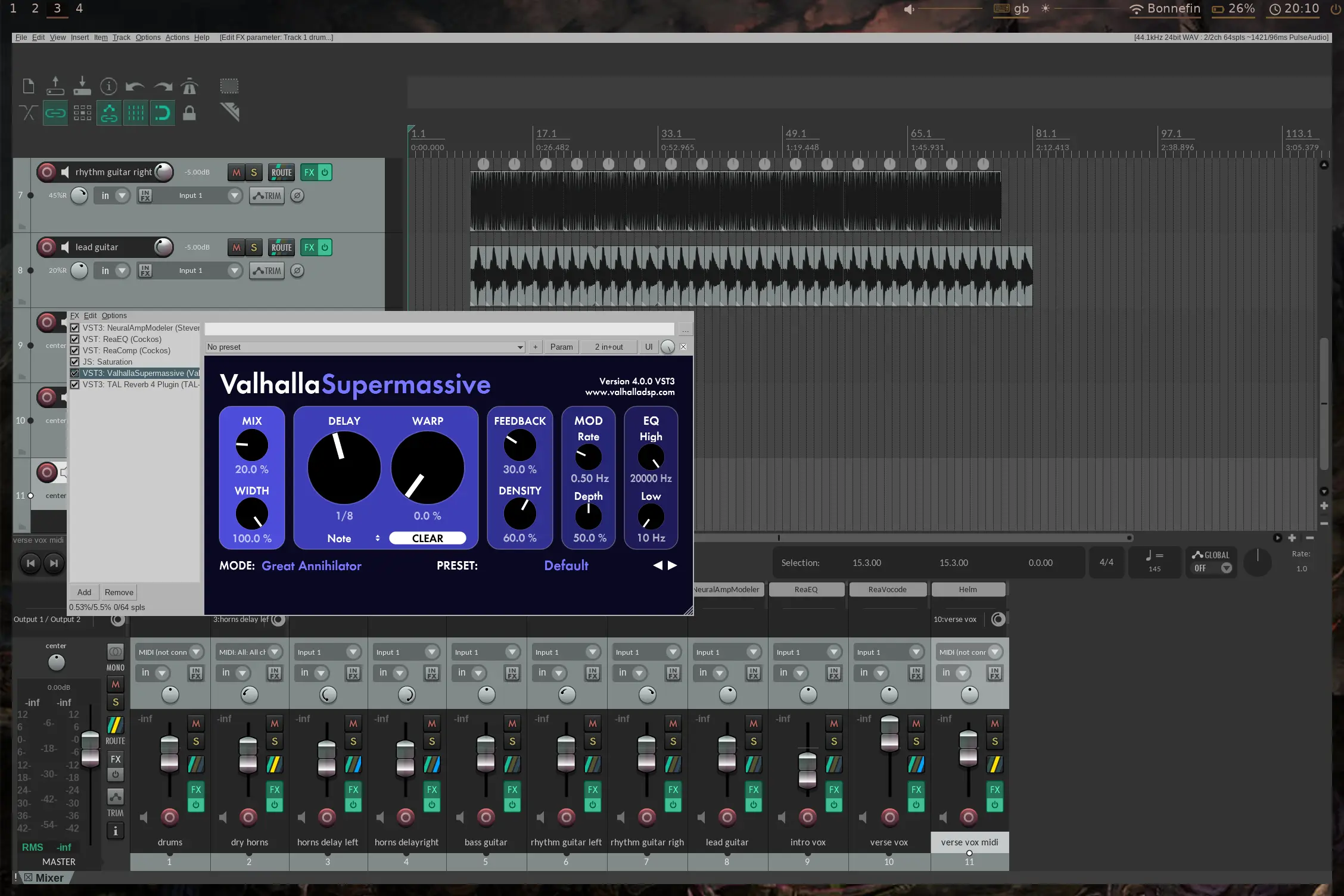
Most plugins work without issue. Valhalla Supermassive, Neural Amp Modeler, TDR Nova, MT-PowerDrumKit, Ripchord, Auto-Tune (the full Antares suite), and Ample Guitar M Lite 2 all run perfectly. JUCE-based plugins tend to work well across the board.
The failures are predictable: plugins with aggressive DRM or phone-home activation sometimes can’t get through Wine’s networking stack. Some GUIs have minor rendering glitches. Nothing that’s stopped me from working.
Latency and Performance Link to heading
The bridging adds negligible latency. Yabridge communicates between the Linux host and Wine guest via shared memory and UNIX sockets. In practice, less than 1ms of additional latency from the bridge itself, far below the audio buffer latency.
CPU overhead is slightly higher than native plugins because Wine’s translation layer adds some cost to every Windows API call. For most plugins this is invisible. Extremely CPU-heavy synths with high unison counts are maybe 10-15% more expensive than they’d be on native Windows. Still usable, just worth noting if you’re stacking many instances.
The Gotchas Link to heading
Wine prefix corruption: If a plugin installer goes wrong, it can corrupt the prefix. I’ve had to nuke ~/.wine and rebuild from scratch once. Keep a backup of your prefix once you have a stable setup, or at minimum note down every winetricks verb and plugin you installed.
Plugin GUI scaling: HiDPI displays can cause problems. I’ve run into scaling issues with some plugins where they will render at 1x scale inside a 2x window, appearing tiny. Others render correctly. There’s no universal fix I’m aware of; it’s per-plugin.
REAPER’s plugin scan: After running yabridgectl sync, tell REAPER to re-scan its plugin paths. It won’t detect new bridged plugins automatically.
Wine updates: A Wine update can break previously working plugins. Pin your wine-staging version once things work, and only update deliberately. On Debian this means sudo apt-mark hold winehq-staging wine-staging wine-staging-amd64 wine-staging-i386.
Shared prefix with games: I’m not much of a gamer anymore, but if you are then this is something to watch out for. My Wine prefix also runs Old School RuneScape via the Jagex Launcher. This hasn’t caused conflicts with audio plugins, but be aware that game-specific winetricks (like DirectX overrides) could theoretically interfere. If things get weird, a separate prefix for games is the safer option.
Is It Worth It? Link to heading
For me, yes. I enjoy making music and I’m not willing to run Windows as my daily driver or even dual-boot just for a DAW. The initial setup takes a few hours. After that, the experience is surprisingly normal. Open REAPER, load plugins, make music.
If you only produce music occasionally and have a Windows machine available that you don’t mind using, the effort probably isn’t justified. For a Linux user who wants a single-OS workflow for everything including music production, this is the setup that’s working for me.
WineHQ Debian installation guide for the most up-to-date repository instructions. ↩︎
Yabridge GitHub releases for the latest version. Check here before using the version number in this post. ↩︎